
Platforms
Social Media Image and Video Sizes for X, LinkedIn, Instagram and Threads
November 5, 2026 · 7 min read
Platforms publish two kinds of numbers: hard limits that make an upload fail, and recommended dimensions that make a post look good. This guide separates them. The hard limits below are the ones PostGP checks before it lets you schedule, so they are the numbers that decide whether your post goes out.
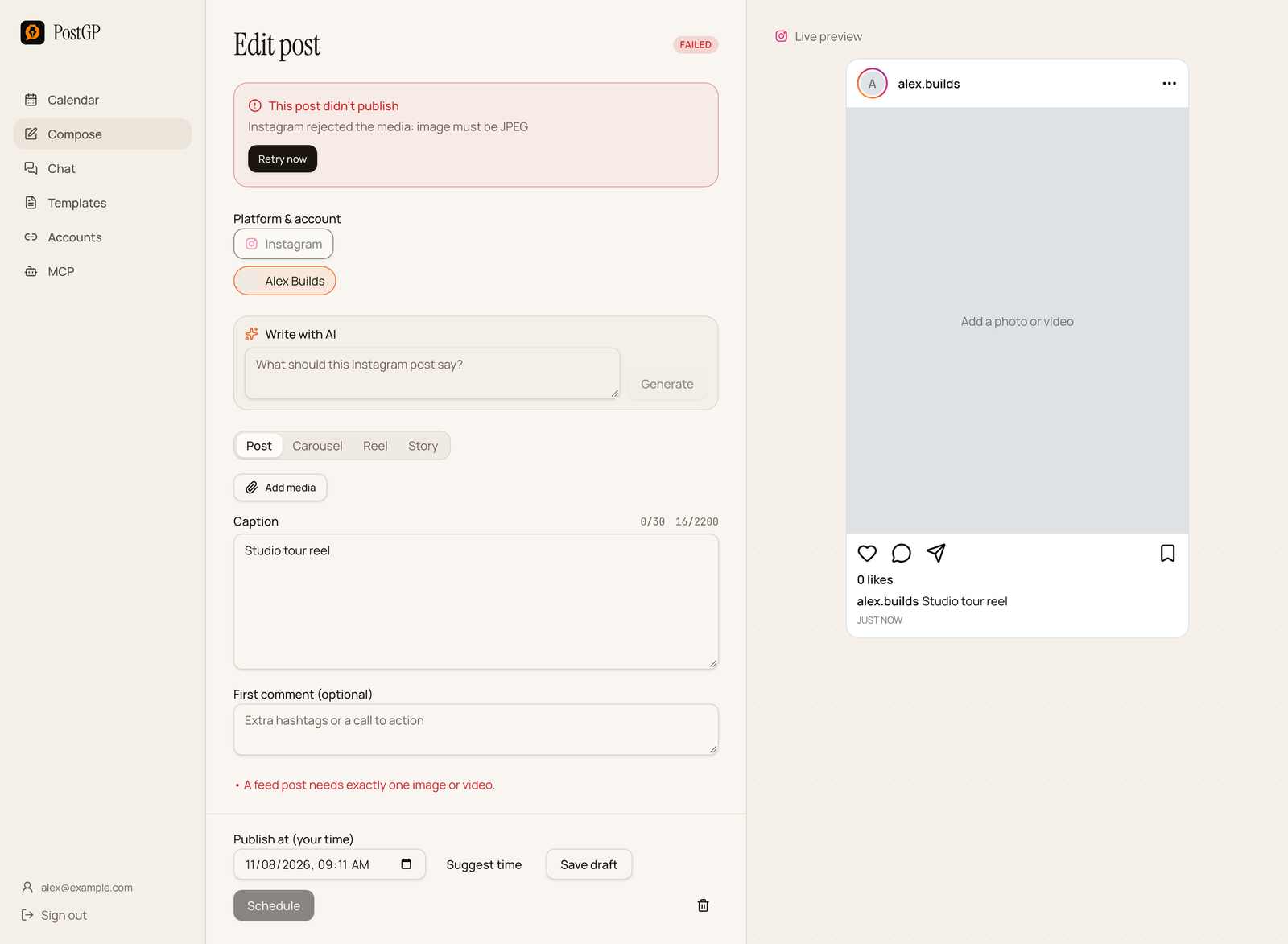
Hard limits vs recommended sizes
A hard limit is enforced by the platform or its API. Break it and the post fails or the upload is refused. A recommended size is a design guideline. Break it and the post still publishes, but it may be cropped, letterboxed or look soft.
The tables below cover hard limits for each platform as PostGP applies them. Aspect-ratio advice comes after, because those figures change more often and sources disagree.
Images
| Platform | How many | Largest file | Format notes |
|---|---|---|---|
| X | Up to 4 per post | 5 MB each | GIFs are separate and must be alone in their post. |
| Up to 20 per post | 36 MB each | Cannot be mixed with video or a document in the same post. | |
| 1 for a feed post, 2 to 10 in a carousel | 8 MB each | JPEG only. PNG is rejected. | |
| Threads | Up to 20 in a carousel | 8 MB each | JPEG or PNG, aspect ratio within 10:1. |
Video, GIFs and documents
| Platform | Video | Other |
|---|---|---|
| X | Up to 512 MB. Videos over 140 seconds need X Premium, so PostGP shows a warning. | GIF up to 15 MB, one per post. No documents. |
| One video, up to 200 MB. | One document (PDF, PowerPoint or Word) up to 100 MB, with a title. | |
| Up to 300 MB. Reels up to 900 seconds, Story videos up to 60 seconds. | No documents. | |
| Threads | MP4 or MOV up to 200 MB and 5 minutes. | Alt text up to 1000 characters per item. |
These are the limits PostGP enforces. A platform can change its own rules at any time, so a file that passes here can still be rejected later. Troubleshooting covers what to do if that happens.
Aspect ratios worth designing for
These are widely recommended sizes, not API limits. Because sources disagree on some details, treat them as defaults and check the platform's own help centre if exact pixels matter to you.
- Instagram feed: 4:5 portrait, 1080 by 1350 pixels, is the usual best general choice. Square (1:1) also works. Instagram has also introduced 3:4 photos, so recent guides mention both.
- Instagram carousels: all slides are shown at the shape of the first one, so pick one ratio for every slide.
- Reels and Stories: 9:16 vertical, 1080 by 1920 pixels. Keep text away from the top and bottom, where the app interface covers the screen.
- LinkedIn: a single image reads well at roughly 1.91:1 wide or 1:1 square. Document carousels are usually 4:5 or square pages.
- X: images are cropped to fit the timeline, so keep the subject centred and put text well inside the edges.
- Threads: portrait works, but stay within the 10:1 ratio limit.
Mistakes that make uploads fail
- Uploading a PNG to Instagram. Export as JPEG first.
- Mixing media types on LinkedIn, for example a video plus images.
- Adding a GIF to an X post that already has images. GIFs and video must stand alone.
- Sending a very tall or wide image to Threads that breaks the 10:1 ratio.
- Forgetting the title on a LinkedIn document.
- Exceeding the platform's file size after an editor exported at maximum quality.
How PostGP checks media before you schedule
Every limit above is checked in the editor as you add media. If a file is over the limit, or the wrong type for that platform, you see the reason beside the preview and the Schedule button stays disabled. That is deliberate: a failure at 9 am when you are away is worse than a warning today.
If a platform still rejects a file at publish time, the post is marked failed with the platform's reason, and you can fix the file and retry it from the post's editor.
Frequently asked questions
- What size should an Instagram post be?
- 4:5 portrait at 1080 by 1350 pixels is the most common recommendation for feed posts. The hard requirements are JPEG format and under 8 MB.
- Why does Instagram reject my PNG?
- Publishing through Instagram's API accepts JPEG images only. Convert the file to JPEG and try again.
- Can I post a GIF with images on X?
- No. A GIF or a video must be alone in its post. Put images in a separate post or thread part.
- What is the largest video I can schedule?
- It depends on the platform: 512 MB on X, 300 MB on Instagram, 200 MB on LinkedIn and Threads.
Keep reading
Schedule your posts with PostGP
Plan Instagram, X, LinkedIn and Threads posts in one calendar.
Get started