
Platforms
How to Schedule Threads Posts with Images, Videos and Carousels
November 6, 2026 · 6 min read
A text-only Threads post is easy to schedule. Add a photo, a video or a carousel and a few extra rules apply: which files Threads accepts, where alt text goes, and why a link card and an image can't share a post. This guide walks through scheduling a media post in PostGP and avoiding the mistakes that block it.
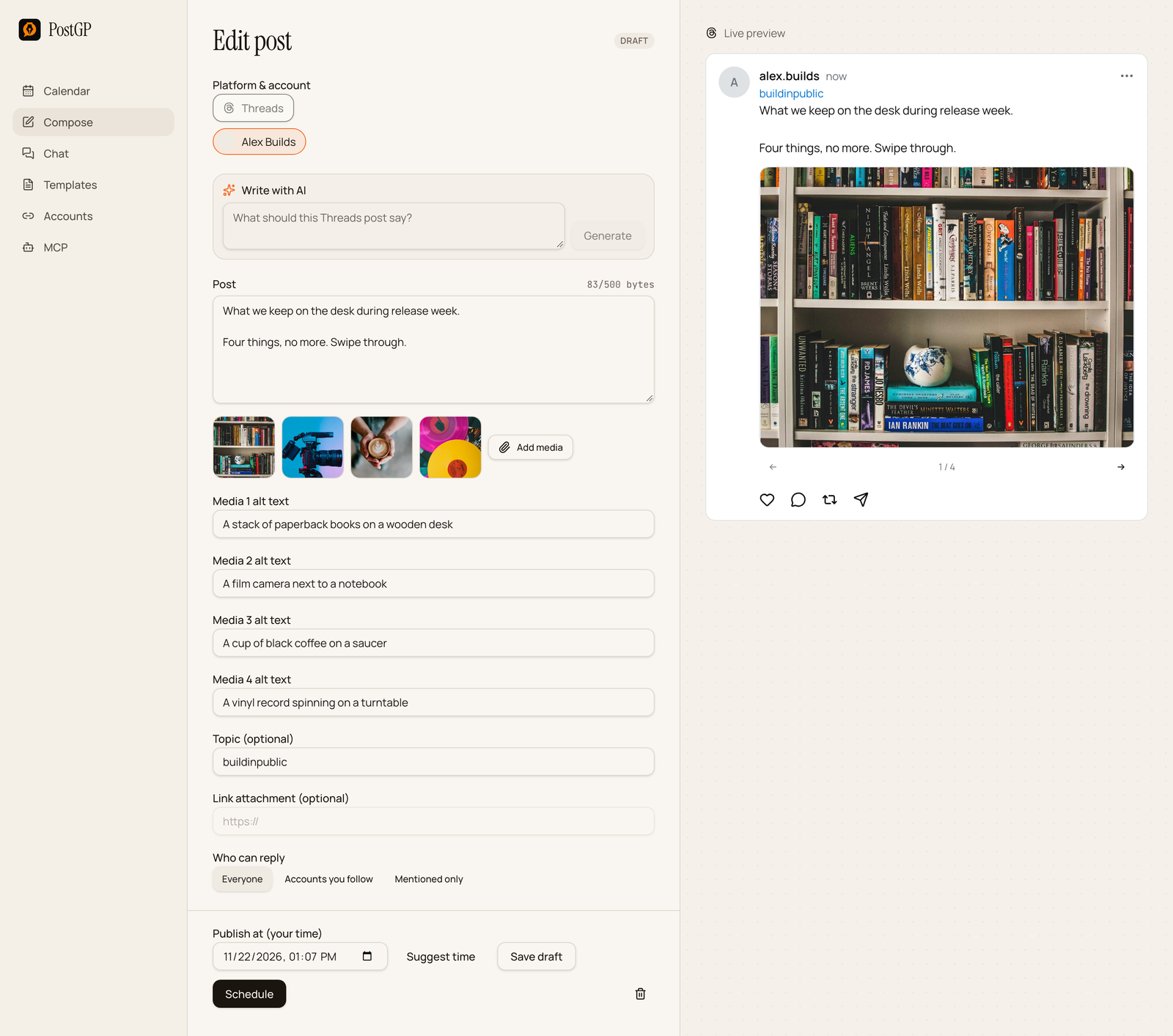
What Threads accepts
One post can carry up to 20 media items, and several items publish as a carousel.
| Type | Format | Limits |
|---|---|---|
| Image | JPEG or PNG | 8 MB, aspect ratio within 10:1 |
| Video | MP4 or MOV | Up to 5 minutes and 200 MB, longer than 0 seconds |
| GIF or document | Not supported | Not available |
Unlike Instagram, Threads accepts PNG images, so exports from design tools usually work without converting.
Schedule a media post in six steps
- Open Compose, choose Threads, and pick your account.
- Write the text. The counter reads in bytes out of 500, not characters.
- Press Add media and choose your images or video. Reorder them if the sequence matters.
- Fill in the alt text for each item.
- Add a topic if you want one, and choose who can reply.
- Pick a time with Publish at or Suggest time, then press Schedule.
Build a carousel
Add more than one item and the post becomes a carousel, up to 20 items. The preview has arrows and a counter, so you can swipe through exactly as a reader will.
A carousel works best when each item adds something: steps in order, before and after, or a set of examples. Put the strongest item first, since it is the one that stops the scroll.
- Keep the text short. The images carry the message.
- Use consistent dimensions so the carousel doesn't jump between shapes.
- Tell people to swipe in the text, as in “Swipe for the four steps”.
Write alt text for every item
Each image and video gets its own Media alt text field, up to 1,000 characters. It makes the post usable for people who use screen readers, and PostGP shows one field per item, so none gets skipped by accident.
Describe what is in the picture and why it matters to the post. “A stack of paperback books on a wooden desk” is better than “books”, and better than leaving it empty.
Why a link card and media can't share a post
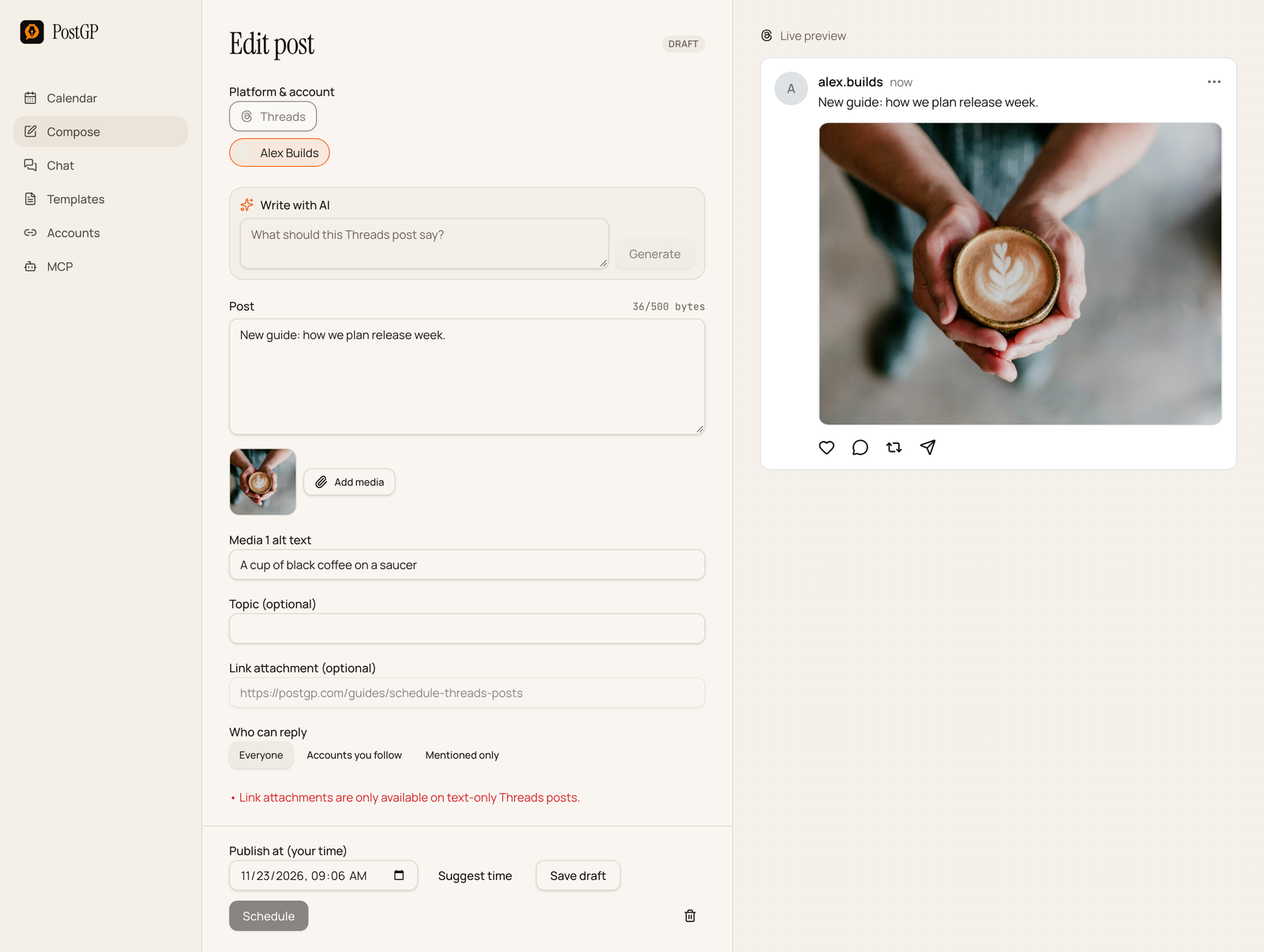
A link card is the preview box Threads builds from a URL. It is only available on text-only posts. If you attach media and fill in Link attachment, PostGP shows an error and keeps Schedule disabled.
You have two ways around it: remove the media and keep the link card, or keep the media and put the link in the text. A post can contain up to five unique links in total.
| You want | Do this |
|---|---|
| A link preview card | Text-only post with Link attachment filled in |
| A photo or video | Media post with no link attachment |
| Both a photo and a link | Media post with the URL typed into the text |
Who can reply
Choose Everyone, Accounts you follow, or Mentioned only for each post. Everyone is the default and the most open choice.
What to expect after you schedule
Posts with images or video take a little longer to publish than text, because Threads prepares the media before the post goes live. PostGP follows that process and resumes it if more time is needed.
If Threads gives an unclear answer, PostGP won't publish again on its own, which prevents duplicates. The post shows its status so you can check Threads before deciding what to do.
If a Threads media post is blocked or fails
The editor shows the reason next to the field, and a failed post shows it at the top. Most are fixed in one step:
| Message | Fix |
|---|---|
| Link attachments are only available on text-only posts | Remove the media or clear the Link attachment field. |
| Images must be 8 MB or smaller | Compress the image and replace it. |
| Aspect ratio must be within 10:1 | Crop extremely tall or wide images. |
| Videos can be at most 5 minutes | Trim the video. |
| Threads accepts JPEG/PNG images and MP4/MOV videos | Convert GIFs and documents to a supported type, or leave them out. |
| Topic tags cannot contain periods, ampersands, semicolons or colons | Remove those characters from the topic. |
Frequently asked questions
- How many images can I put in a Threads post?
- Up to 20 items in one post. More than one publishes as a carousel.
- Can I schedule a video on Threads?
- Yes. MP4 or MOV, up to 5 minutes and 200 MB.
- Can I add a link to a post with an image?
- Not as a link card. Put the URL in the text instead, and keep to five unique links per post.
- Does Threads accept PNG images?
- Yes, JPEG and PNG up to 8 MB each.
- Is alt text required?
- It isn't required, but PostGP gives every item its own field and it makes the post accessible.
Keep reading
- PlatformsPosting on Threads: Byte Limits, Topic Tags, Link Cards and Reply Controls
- PlatformsHow to Schedule Threads Posts: Built-in Scheduler vs a Scheduling Tool
- PlatformsSocial Media Image and Video Sizes for X, LinkedIn, Instagram and Threads
- PlatformsSocial Media Character Limits for X, LinkedIn, Instagram and Threads (2026)
Schedule your posts with PostGP
Plan Instagram, X, LinkedIn and Threads posts in one calendar.
Get started