
Strategy
Threads Post Templates: 7 Formats to Copy, Within the 500-Byte Limit
November 6, 2026 · 7 min read
Threads posts are short, conversational and capped at 500. A template helps because short posts leave no room for waffle: the shape has to do the work. Below are seven formats with a structure and an example each, plus the Threads-specific details that decide whether a post fits: the byte limit, topic tags and link cards.
What makes a Threads post different
Three details shape every template here.
- The limit is 500, counted in UTF-8 bytes. Plain English letters use 1 byte each, accented letters 2, many Asian characters 3, and emoji 4. A short post with several emoji uses more of the limit than it looks.
- A post carries one optional topic tag instead of hashtags. Type it without a hash sign, and avoid periods, ampersands, semicolons and colons.
- A link card is available only on text-only posts. If you attach media, put the link in the text instead.
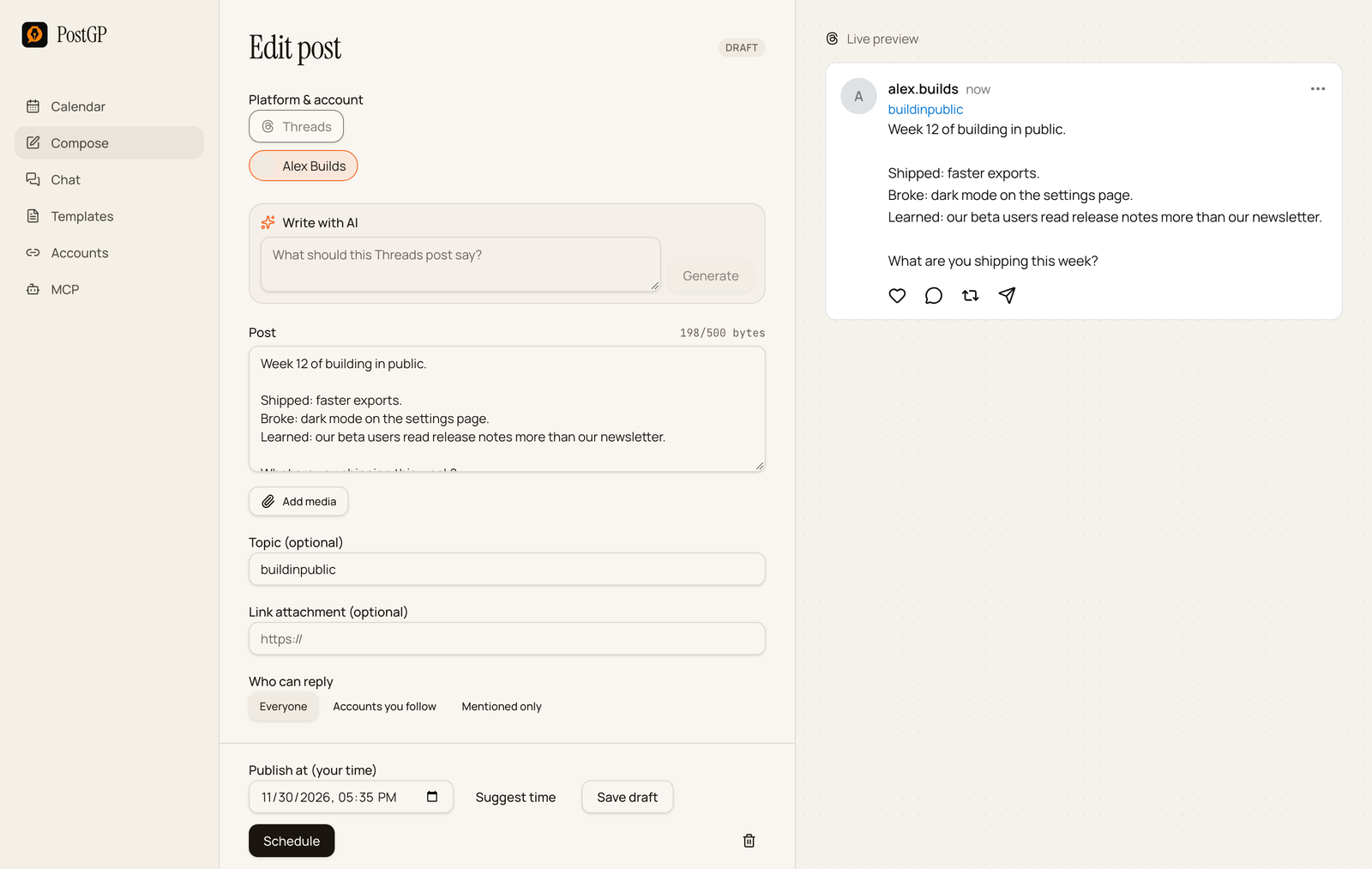
PostGP shows the live byte count in the editor and blocks scheduling over 500, so you can't submit a post that would be rejected.
1. The build-in-public update
Use it for a regular progress note. Its repeated shape is what makes it easy to write and easy to follow.
[Week or milestone] of [project].

Shipped: [what].
Broke: [what].
Learned: [what].

[Question for the reader].
Week 12 of building in public.

Shipped: faster exports.
Broke: dark mode on the settings page.
Learned: our beta users read release notes more than our newsletter.

What are you shipping this week?
Add a topic such as buildinpublic so the post sits with others on the subject.
2. The hot take
Use it for a view you can defend in a sentence or two.
[Strong claim].

[One reason].

[Where it stops being true].
Your changelog is a marketing page.

It's the only page every customer actually reads after they sign up.

Unless you ship nothing, in which case it's an apology.
3. The question
Use it when you want replies. Keep it narrow so it's easy to answer.
[Narrow question]?

Mine: [your answer].
What is one step in your release process you'd delete tomorrow?

Mine: the sign-off meeting.
Set Who can reply to Everyone for this one. A question people can't answer defeats the purpose.
4. The tips list
Use it for three quick, specific points. At 500 bytes, three is usually the limit.
[N] [things] for [audience]:

1. [Tip]
2. [Tip]
3. [Tip]
3 habits that made our releases calmer:

1. Write the release notes first
2. Ship before noon
3. Keep a rollback ready
5. The link post
Use it to share an article, a guide or a release. Say why it's worth the click, then attach the link.
[What the link is and the one thing it shows].

[Why it's worth reading].
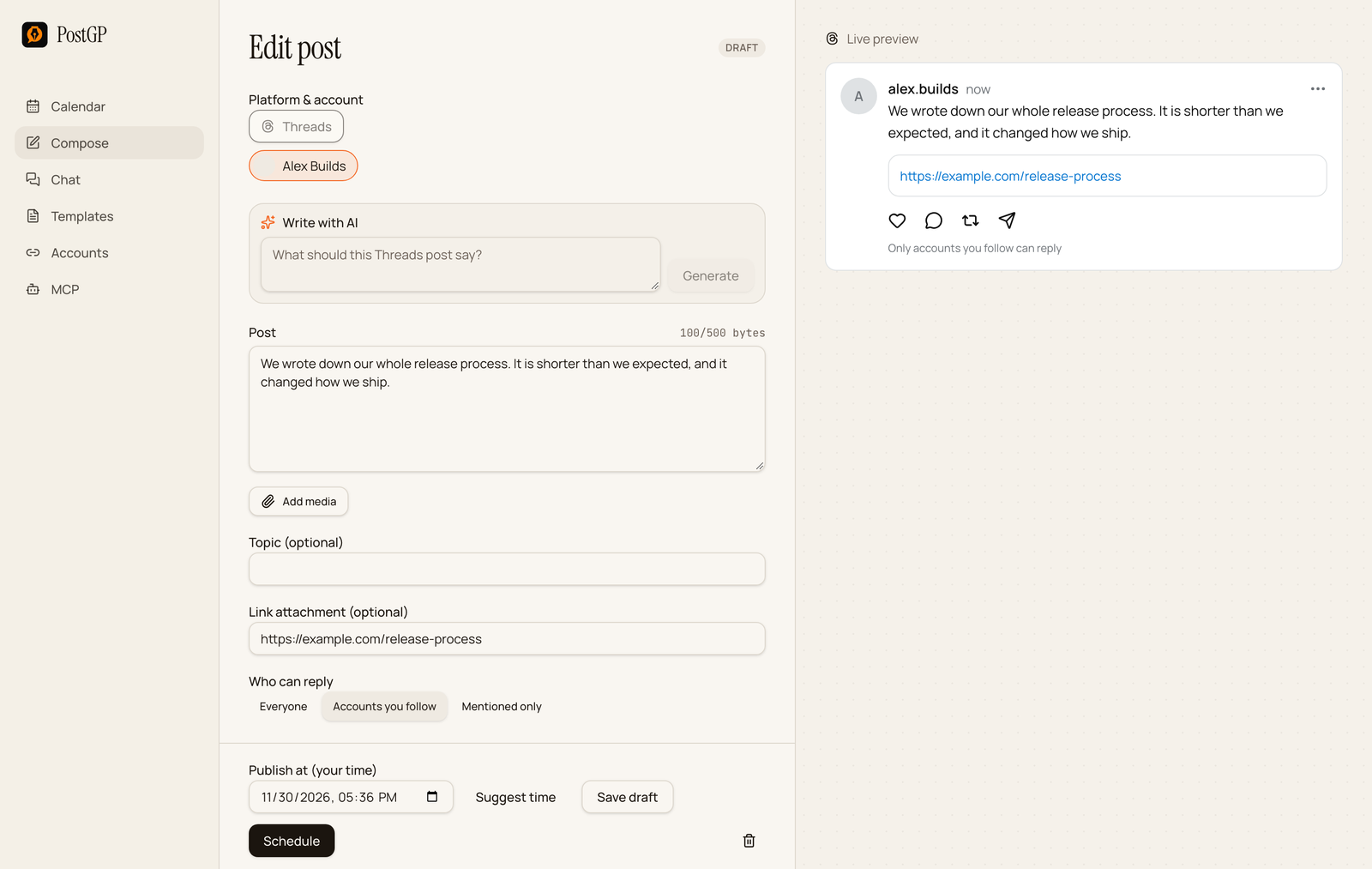
We wrote down our whole release process. It is shorter than we expected, and it changed how we ship.
Fill in Link attachment for the preview card, and keep the post text-only. A post can contain up to five unique links in total.
6. The short story
Use it for a small moment: what happened, and what it taught you.
[The moment, in one line].

[What happened next].

[The takeaway].
We nearly cancelled the launch two days out.

The export tool failed on every large file, so we cut three features and shipped the fix.

Smaller and working beats bigger and broken.
7. The carousel intro
Use it with up to 20 images or videos in one post. The text sets up the swipe, and the media carries the content.
[What the carousel shows, with a number].

Swipe through. [What to look for].
What we keep on the desk during release week.

Four things, no more. Swipe through.
Give every image alt text. PostGP shows one field per item, and the guide on Threads carousels covers it.
Schedule a Threads post
- Open Compose and choose Threads.
- Paste the post and check the byte counter.
- Add a topic if you want one, and choose who can reply.
- Attach a link, or attach media, but not both.
- Pick a time and press Schedule.
Frequently asked questions
- What is the Threads character limit?
- 500. PostGP counts UTF-8 bytes, so emoji and non-English characters use more of the limit than plain letters.
- Can I use hashtags on Threads?
- Threads uses one topic tag per post. Type it into the Topic field without a hash sign.
- Can I add a link and an image to the same post?
- Not as a link card. A link card is for text-only posts, so for media posts, put the URL in the text.
- How many links can a post have?
- Up to five unique links, including a link attachment.
- Can I control who replies?
- Yes. Choose Everyone, Accounts you follow, or Mentioned only for each post.
Keep reading
- PlatformsPosting on Threads: Byte Limits, Topic Tags, Link Cards and Reply Controls
- PlatformsHow to Schedule Threads Posts with Images, Videos and Carousels
- PlatformsHow to Schedule Threads Posts: Built-in Scheduler vs a Scheduling Tool
- PlatformsSocial Media Character Limits for X, LinkedIn, Instagram and Threads (2026)
Schedule your posts with PostGP
Plan Instagram, X, LinkedIn and Threads posts in one calendar.
Get started