
Strategy
X Thread Templates: 7 Structures You Can Copy, With Examples
November 6, 2026 · 8 min read
A thread works when the first post earns the click and every post after it earns the next one. These seven templates give you the shape, so you can spend your time on the content. Each has a structure, a short example, and a note on the mistake to avoid. At the end is how to check the length and schedule the whole thread in one go.
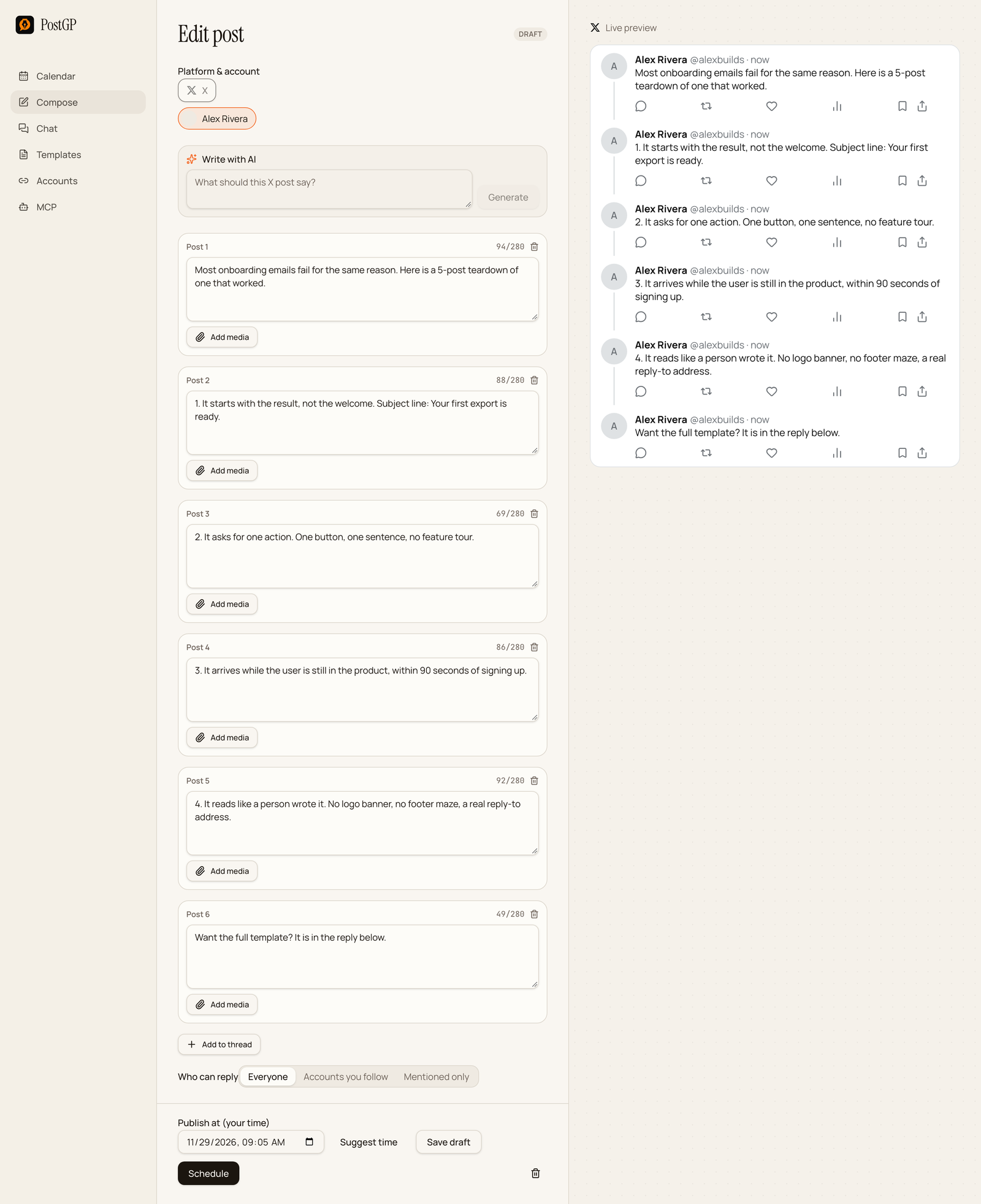
1. The teardown
Use it to break down something that worked: an email, a landing page, a launch, a process.
Post 1: [Thing] fails for [reason]. Here is a [N]-post teardown of one that worked.

Post 2: 1. [What it did first, and why it matters]

Post 3: 2. [Second thing, with a detail]

Post 4: 3. [Third thing, with a detail]

Post 5: [What to copy from it].

Post 6: [Next step or link].
Most onboarding emails fail for the same reason. Here is a 5-post teardown of one that worked.

1. It starts with the result, not the welcome. Subject line: Your first export is ready.

2. It asks for one action. One button, one sentence, no feature tour.

3. It arrives while the user is still in the product, within 90 seconds of signing up.
Quote or show the real thing. A teardown with no specifics is just an opinion.
2. The story
Use it when something happened to you and the order of events is the interesting part.
Post 1: [Surprising outcome]. Here is how it happened.

Post 2: [Where it started, one detail].

Post 3: [The turn: what went wrong or changed].

Post 4: [What you did].

Post 5: [Result, with a number].

Post 6: [The lesson, in one line].
We lost our biggest customer in a single email. Here is how it happened.

They had asked for one export fix. We put it behind a roadmap item.

Three weeks later their data team found the bug themselves.
Cut the middle. If a post doesn't move the story forward, delete it.
3. The lessons list
Use it for what you learned from a period, a project or a mistake.
Post 1: [N] lessons from [specific experience].

Post 2: 1. [Lesson]. [Why, in one sentence].

Post 3: 2. [Lesson]. [Why, in one sentence].

Post 4: 3. [Lesson]. [Why, in one sentence].

Post 5: If you remember one: [the most important].
Five lessons from shipping every week for a year.

1. Smaller scope beats a bigger roadmap. Every week we cut one thing and nobody missed it.

2. Write the release notes first. If you can't explain it in three lines, it isn't ready.
4. The mistakes thread
Use it to warn people off something you have seen go wrong, including your own errors.
Post 1: [N] mistakes I see in [area], and what to do instead.

Post 2: Mistake 1: [What people do]. Instead: [fix].

Post 3: Mistake 2: [What people do]. Instead: [fix].

Post 4: Mistake 3: [What people do]. Instead: [fix].

Post 5: [Which one costs the most, and why].
Four mistakes I see in launch announcements, and what to do instead.

Mistake 1: Starting with the company. Instead: start with what changed for the reader.

Mistake 2: Listing every feature. Instead: lead with the one that matters most.
Include at least one mistake you made yourself. It makes the advice believable.
5. The case study
Use it when you have a before, an after and a clear reason for the change.
Post 1: [Result with a number] in [time]. Here is exactly what we did.

Post 2: Starting point: [state, with a number].

Post 3: Step 1: [action and reason].

Post 4: Step 2: [action and reason].

Post 5: Result: [number]. What I would change: [one thing].
We cut export time from 60 seconds to 20 in two weeks. Here is exactly what we did.

Starting point: one process, every project, one thread.

Step 1: profile before changing anything. 70% of the time was in one function.
Only share numbers you can defend, and say how you measured them.
6. Myth versus reality
Use it to correct a common belief, with evidence.
Post 1: Myth: [common belief]. Reality: [what is true]. A thread.

Post 2: Why people believe it: [reason].

Post 3: What actually happens: [evidence or example].

Post 4: When the myth is true: [honest exception].

Post 5: What to do instead.
Myth: you need to post every day. Reality: you need something to say. A thread.

Why people believe it: early accounts grew fast, and daily posting is easy to copy.

When it is true: if you have a backlog of real stories. If you are inventing them, it isn't.
7. The launch thread
Use it for a release, a feature or a product. It leads with the benefit, then proves it.
Post 1: [What you launched], so you can [benefit].

Post 2: The problem: [what it was like before].

Post 3: What it does: [feature, shown or quoted].

Post 4: What else is in it: [one or two extras].

Post 5: Try it: [link].
v2.4 is out: exports run 3x faster, so large projects finish in under 20 seconds.

The problem: a one-minute export was long enough to make people switch tabs and forget.

Also in this release: dark mode follows your system, and renaming a project keeps its tags.
Check the length before you schedule
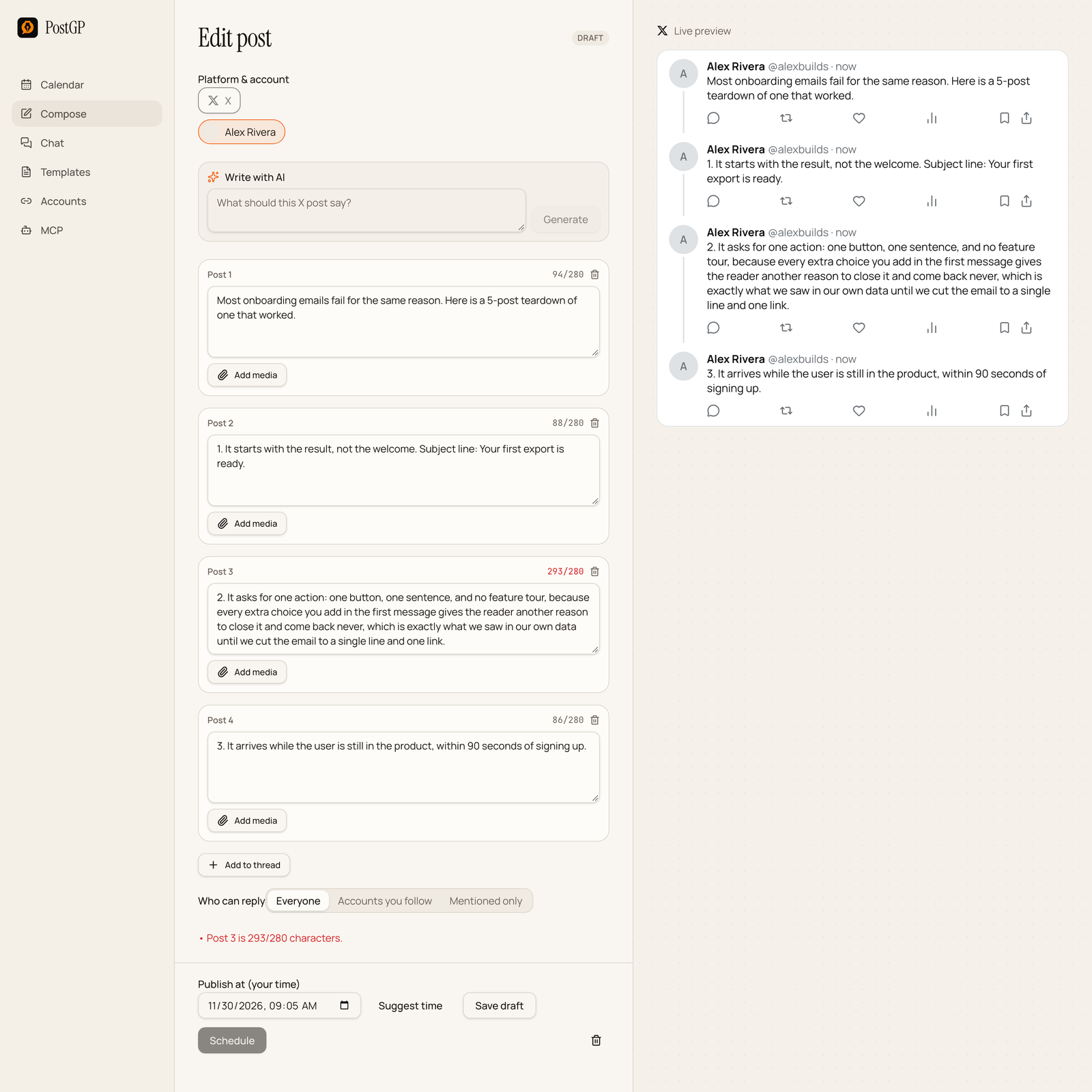
Each post has its own counter. If one goes over 280, PostGP names it, for example “Post 3 is 293/280 characters”, and keeps Schedule disabled until it is fixed. Trim the post or split it into two.
Remember the weighting: any link counts as 23, and emoji count as 2. A post that looks short can still be over.
Schedule the whole thread at once
- Open Compose and choose X.
- Write post 1, then press Add to thread for each next post.
- Check every counter, and read the preview from top to bottom.
- Set one publish time. The thread goes out as a single scheduled item, in order.
- Press Schedule.
For the full flow, including editing and unscheduling, see the guide on scheduling posts on X.
Frequently asked questions
- How long should an X thread be?
- As long as it needs, up to 25 posts in PostGP. Most work best at 5 to 9, with one point per post.
- Where should I put the link?
- In the last post. Every link counts as 23 characters, whatever its length.
- Can I add images to a thread?
- Yes. Each post can have its own media. A video or GIF has to be the only media in its post.
- Can I schedule the whole thread in one go?
- Yes. A thread is scheduled as one item with a single publish time, and the posts go out in order.
- What if one post is too long?
- PostGP names the post and disables Schedule. Shorten it or split it into two posts.
Keep reading
- PlatformsHow to Schedule Posts on X (Twitter): Step-by-Step, Including Threads
- PlatformsPosting on X: Character Counting, Threads, Media Limits and Scheduling
- PlatformsSocial Media Character Limits for X, LinkedIn, Instagram and Threads (2026)
- Strategy8 LinkedIn Post Templates You Can Copy, With Examples and the Fold Rule
Schedule your posts with PostGP
Plan Instagram, X, LinkedIn and Threads posts in one calendar.
Get started