
Strategy
8 LinkedIn Post Templates You Can Copy, With Examples and the Fold Rule
November 6, 2026 · 8 min read
A template is not a shortcut to a good post. It is a shape that saves you deciding how to start. Each template below has a structure you can fill in, a worked example, and the one thing that makes it work. All of them follow the same rule: LinkedIn shows only the first lines, so the opening has to earn the tap.
The fold rule, in one minute
LinkedIn shows roughly the first 210 characters of a post before “see more”. Whatever sits above that line is the only part most people read. A template that spends those characters on setup wastes the post, so every template here puts the claim, result or question first.
Write the post, then check the preview. If the visible part could be deleted and the post would still make sense, rewrite it.
The full limit is 3,000 characters, but the point of a template is to say one thing clearly, not to fill the space.
1. The lesson learned
Use it when something went wrong or surprised you, and you can name what you would do differently.
[One-line lesson, stated plainly].

What happened: [two sentences, with a real detail].

What I would do differently:
- [Change 1]
- [Change 2]

[One question for the reader].
We shipped without a rollback plan, and it cost us a Friday.

What happened: a config change went out at 4 pm and took the export page down for two hours.

What I would do differently:
- Write the rollback before the release
- Never ship configuration after noon

What is your rule for Friday releases?
It works because of the real detail. A lesson with no specifics reads like advice anyone could write.
2. Before and after
Use it when you have a measurable change. The comparison itself is the hook.
Before: [state, with a number].
After: [state, with a number].

What changed was not [obvious cause]. It was [real cause].

[How you did it, in one or two lines].
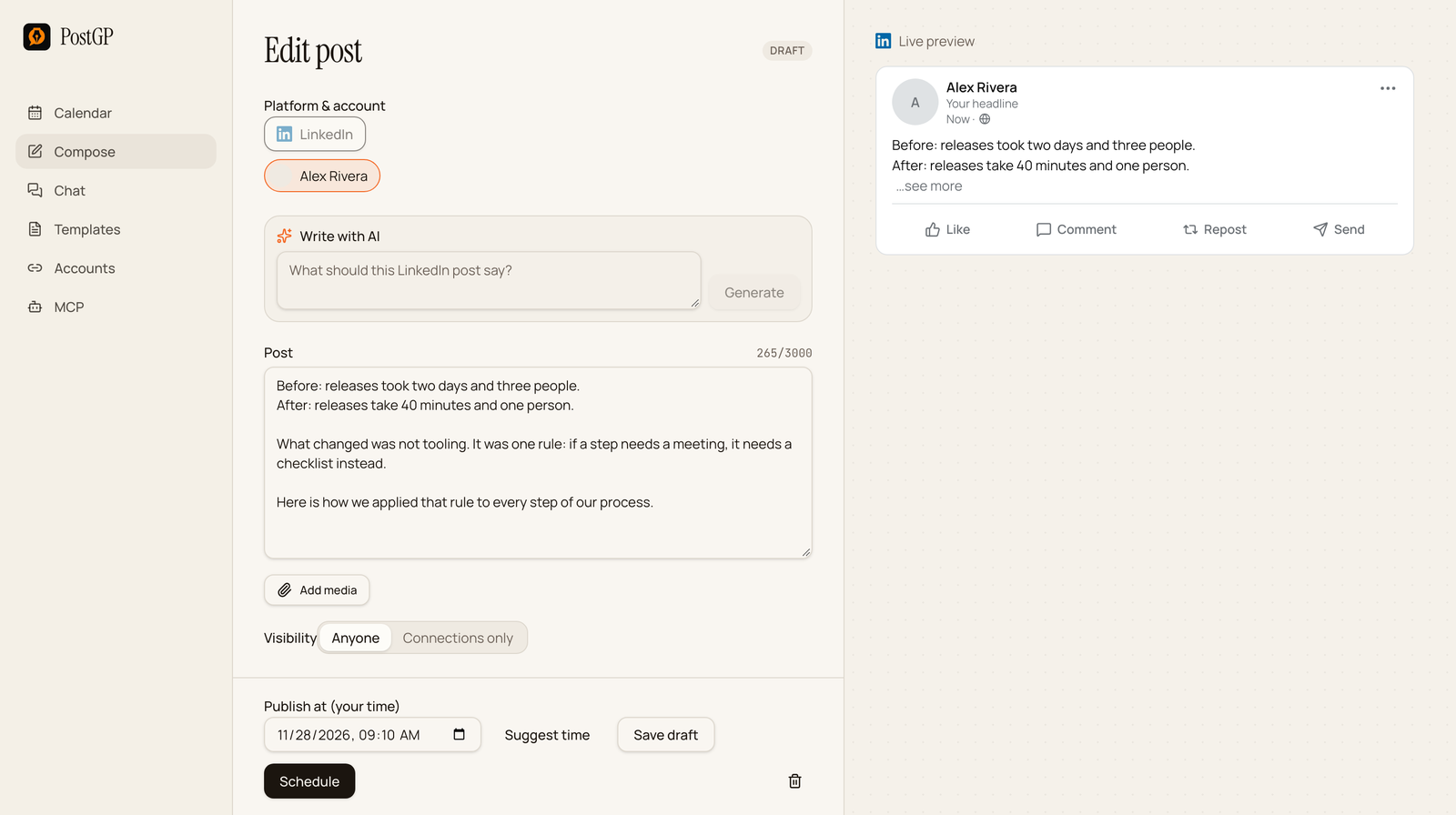
Before: releases took two days and three people.
After: releases take 40 minutes and one person.

What changed was not tooling. It was one rule: if a step needs a meeting, it needs a checklist instead.

Here is how we applied that rule to every step of our process.
Only use numbers you can defend. If a reader asks how you measured it, you should have an answer.
3. The numbered list
Use it for steps, tools, mistakes or lessons. A list is easy to scan, which helps readers who skim.
[Claim that introduces the list, with a number].

1. [Item and why it matters]
2. [Item and why it matters]
3. [Item and why it matters]

[What you kept or what the reader should do first].

[Question].
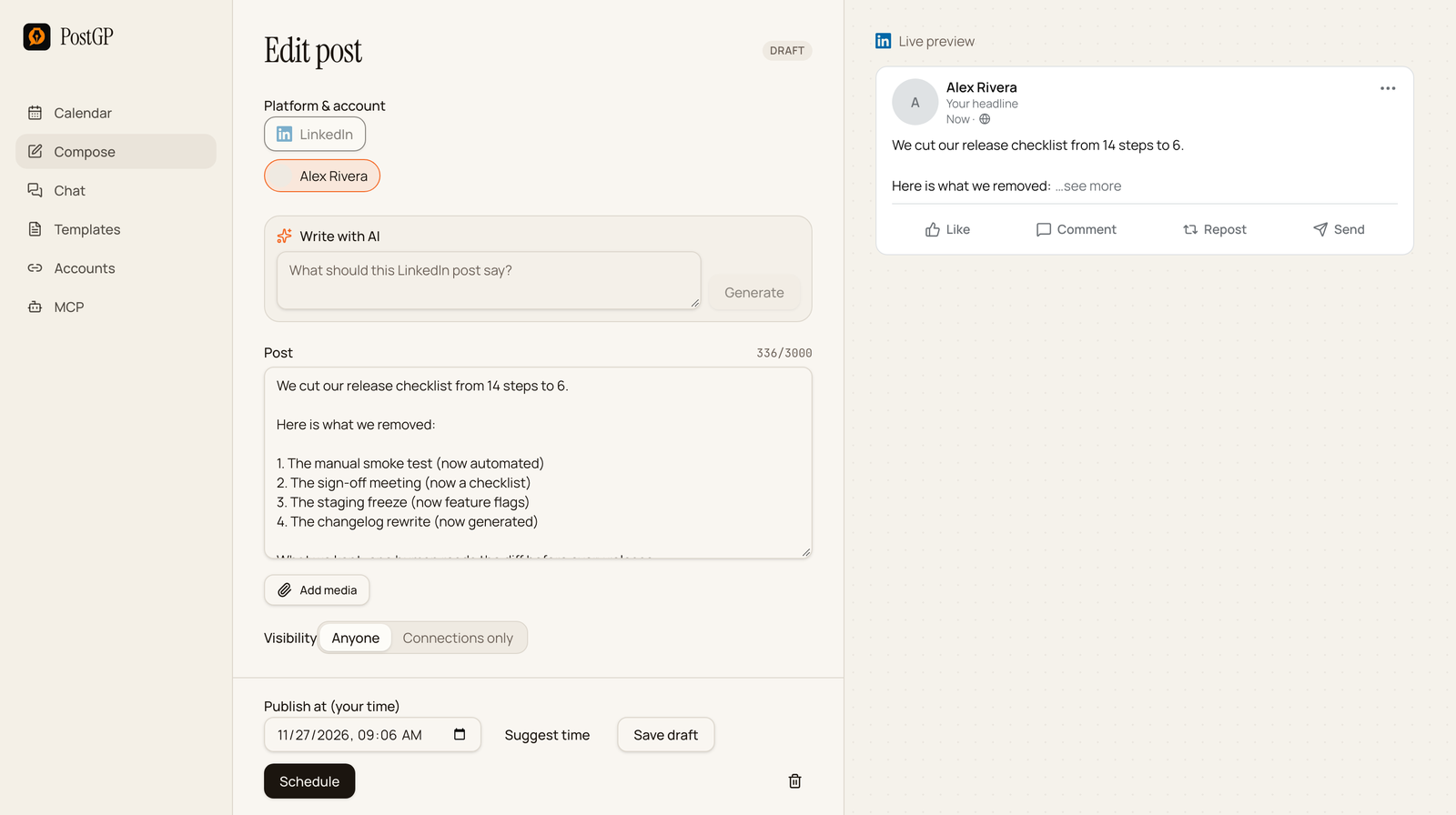
We cut our release checklist from 14 steps to 6.

Here is what we removed:

1. The manual smoke test (now automated)
2. The sign-off meeting (now a checklist)
3. The staging freeze (now feature flags)

What we kept: one human reads the diff before every release.

Which step would you cut first?
Keep each item to one line, and say what replaced it. A list of bare nouns teaches nothing.
4. The contrarian take
Use it when you hold a view that differs from common advice and can back it up.
[Common advice] is wrong for [specific audience].

Here is why: [one reason with evidence].

It works when [condition]. It fails when [condition].

[What to do instead].
Posting every day is wrong for a team of one.

Here is why: after week three I was writing to fill the calendar, not because I had something to say.

Daily works when you have a backlog of stories. It fails when you are inventing them.

I now post three times a week and keep one slot open for something real.
Name the condition where the common advice does work. It makes the take credible instead of loud.
5. Behind the scenes
Use it to show how work gets done: a process, a decision, a trade-off.
Here is how we [do a specific thing].

[The situation in one line].

The decision: [what you chose].
The trade-off: [what it cost you].

[What you would tell someone facing the same choice].
Here is how we decide what goes in a release.

The situation: eleven requests, room for four.

The decision: ship what unblocks the most customers this week.
The trade-off: two features with louder fans waited a sprint.

If you are choosing between loud and blocking, pick blocking.
7. The question
Use it when you really want to hear from people, not as a trick for comments.
[Specific question, narrow enough to answer in a line]?

My answer: [your answer and one reason].

[Why you are asking, and what you will do with the replies].
What is one step in your release process you would delete tomorrow?

Mine: the sign-off meeting. It never changed a decision.

I am rewriting our checklist this month and will post what I cut.
A broad question like “thoughts?” gets nothing. A narrow one is easy to answer.
8. The announcement
Use it for a launch, a release or news. Lead with what changed for the reader, not with your excitement.
[What is new], and what it means for you: [benefit].

What changed:
- [Change 1]
- [Change 2]

[Where to find it or what to do next].
Exports are now 3x faster. Large projects that took a minute finish in under 20 seconds.

Also in v2.4:
- Dark mode follows your system setting
- Renaming a project keeps its tags

Update to the latest version to get both.
Make a template your own
- Pick the template that fits what you actually have, not the one that looks best.
- Fill in real details. A number, a name or a date makes the post specific.
- Cut anything you wouldn't say out loud to a colleague.
- Check the opening in the preview, and move the hook above the fold if it sits below.
- Schedule it for a time when your audience is online.
Draft with your own voice rules
If you generate drafts with AI, the Templates page in PostGP holds voice rules per platform, so a draft already avoids phrases you dislike. Give it a template from this page and your real details, and it will produce a version in your voice. See the guide on AI writing and voice for how.
Frequently asked questions
- How long should a LinkedIn post be?
- The limit is 3,000 characters, but only roughly the first 210 show before see more. Write as much as the idea needs, and make the opening work on its own.
- Should I use hashtags on LinkedIn?
- Hashtags written as plain text still appear in your post. Use a few relevant ones at the end if they help readers find the topic, and don't let them crowd the opening.
- Can I schedule these templates in advance?
- Yes. Paste a filled template into Compose, choose LinkedIn, pick a time and press Schedule.
- Should I attach a document or image?
- It depends on the template. A document suits checklists and decks. A post can carry images, one video or one document, but not a mix.
Keep reading
- PlatformsHow to Schedule LinkedIn Posts: Text, Images, Video and PDF Documents
- PlatformsPosting on LinkedIn: The Fold, Documents, Image Carousels and Scheduling
- Using PostGPWrite Social Posts with AI That Sound Like You: Compose, Chat and Voice Templates
- StrategyHow to Post to X, LinkedIn, Instagram and Threads Without Copy-Pasting
Schedule your posts with PostGP
Plan Instagram, X, LinkedIn and Threads posts in one calendar.
Get started